Skip to main content\(\newcommand{\N}{\mathbb N}
\newcommand{\Z}{\mathbb Z}
\newcommand{\Q}{\mathbb Q}
\newcommand{\R}{\mathbb R}
\newcommand{\lt}{<}
\newcommand{\gt}{>}
\newcommand{\amp}{&}
\definecolor{fillinmathshade}{gray}{0.9}
\newcommand{\fillinmath}[1]{\mathchoice{\colorbox{fillinmathshade}{$\displaystyle \phantom{\,#1\,}$}}{\colorbox{fillinmathshade}{$\textstyle \phantom{\,#1\,}$}}{\colorbox{fillinmathshade}{$\scriptstyle \phantom{\,#1\,}$}}{\colorbox{fillinmathshade}{$\scriptscriptstyle\phantom{\,#1\,}$}}}
\)
Section 7.1 Digital Representation of Characters
How are characters (letters and symbols) stored in the computer’s memory?
In this next video you’ll find out.
Aside: Video Description.
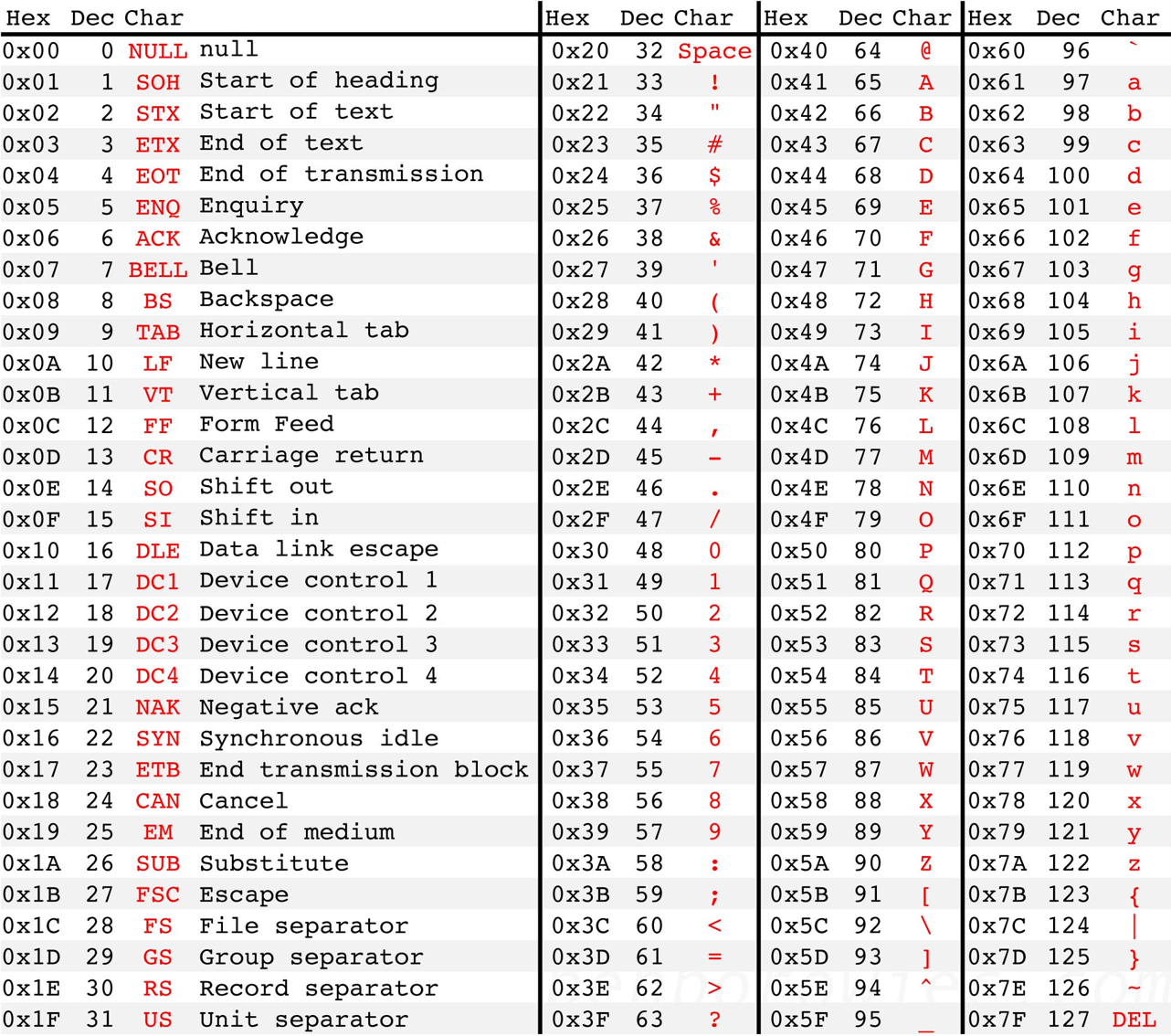
Each character (a, b, ..., A, B, ...), number (0-9), and symbol (*,&!%@) is represented by a 1-byte code:
ASCII code for
X is 88. In HEX:
0x58
In binary, the character
X is represented in memory by 1 byte (8 bits): 01011000
Check Your Understanding Check Your Understanding
1.
Find the 8-bit binary representation of the letter
a (lower case), if the ASCII code is used, as described in the video.
-
01100001
-
Correct!
-
10010111
-
Not quite - try again!
-
01100101
-
Not quite - try again!
-
00100000
-
Not quite - try again!
Hint.
Look at the above table and convert the hexadecimal code into binary.